Key Takeaways
- Shift to high-tier areas in Once Human for unique resources like Aluminum and Tungsten.
- Transitioning base to new areas in the game can be challenging but offers better loot.
- Utilize Territory Grid snapping and follow the steps outlined to ensure a smooth base shift.
Throughout your time in Once Human, you’ll shift your home territory to different locations in a bid to get your hands on unique resources with ease.
While Ores like Copper, Tin, Sulfur, and Iron can be found in low-tier areas, you must shift your base to high-tier areas for Aluminum and Tungsten.
9:15
Related
The Ten Best Survival Games To Play In 2024
Gotta’ craft ’em all.
The nearby loot and enemies’ drops will significantly improve as you move to more difficult areas. But moving around and looking for the ideal spot to settle down can be a chore.
So, to help you find the perfect spot fast, let’s review the steps you must take to shift your base to a new spot.
How To Move Your Territory

I recommend shifting your base to a resource-rich area as soon as a spot is available. With ten worlds per server, the spots are limited for folks who want to seize unique base locations and make the most of their unique specializations to benefit from local resources.

Related
My Palworld Base Building Experience Has Been Way More Fun Than Catching Monsters
What’s better than catching monsters? Putting them to work!
With the introduction of Grid snapping, similar to that found in Palworld, you can precisely place furniture, facilities, and other objects in your territory. That’s perfect for people who want to construct a pixel-perfect base.
Do the following once you’ve made up your mind to shift your base:
Use Flight Mode To Map Out Territory

Press the B key to see the territory area of your base. It will also show the areas covered by other players’ territories. I recommend pressing the “~” key to bring a zoomed-out view of your base.
For those of you frantically searching your keyboard right now, the “`” or “~” key is above the “Tab” key.
Once you’re in Flight mode, you can toggle multiple building settings. Your character will stay at its initial location while you can freely move the camera.
The specific keybindings and their functions are visible on your screen. I prefer to use Flight mode to get a better view of my base.
Maneuver To Find An Eligible Position

You can press the Z key to bring a holographic view of your territory and adjust your base. The hologram will become green to indicate eligible placement.
Otherwise, it’ll be in red, which means a no-go. I usually keep my base a few inches high from the ground to stop the flora from respawning.
There’s a cooldown of ten minutes before you can relocate again. However, if you don’t want to move and still reserve a spot, you can place your camp by pressing the “T” key. The camp serves two purposes: a respawn point and a reserved space.
Your facilities, such as the water pumps, will be disassembled as soon as you confirm the relocation. The materials are sent to your Territory Terminal’s vault, where you can reclaim them.
How To Expand Your Territory 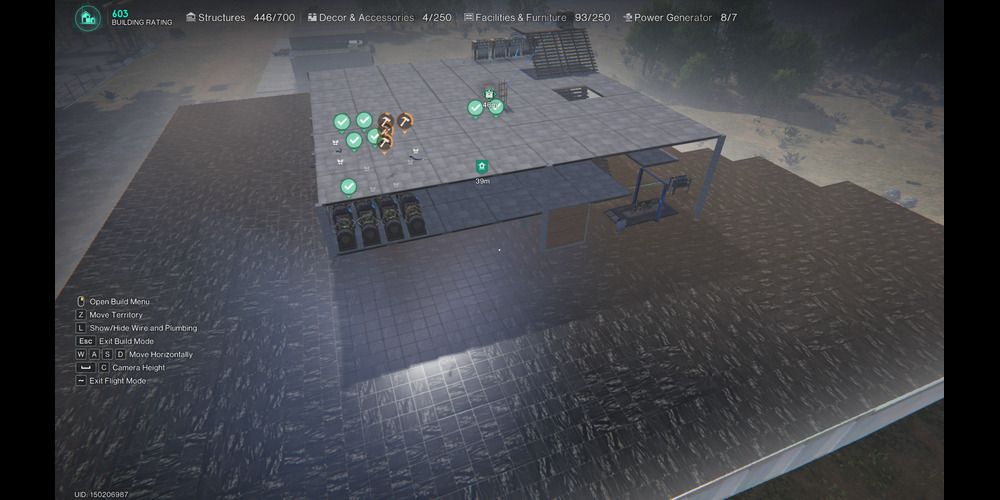
If you’re playing with people you are friends with and trust, you can give them building permissions and build a super base. While you cannot completely merge your territory with others, you can technically combine your bases and dedicate facilities to each base.
I advise you to upgrade your territory by pressing the “H” key on the territory terminal after getting the “Territory expansion” memetic to capture more area and claim more space for facilities.
However, you should avoid building very close to Union Strongholds, in-game buildings, roads, and barriers.

NEXT
Serum’s Survival Horror Took Inspiration From Fallout And BioShock
First-person survival game Serum was influenced by Fallout’s post-apocalyptic atmosphere and BioShock’s mechanics.