
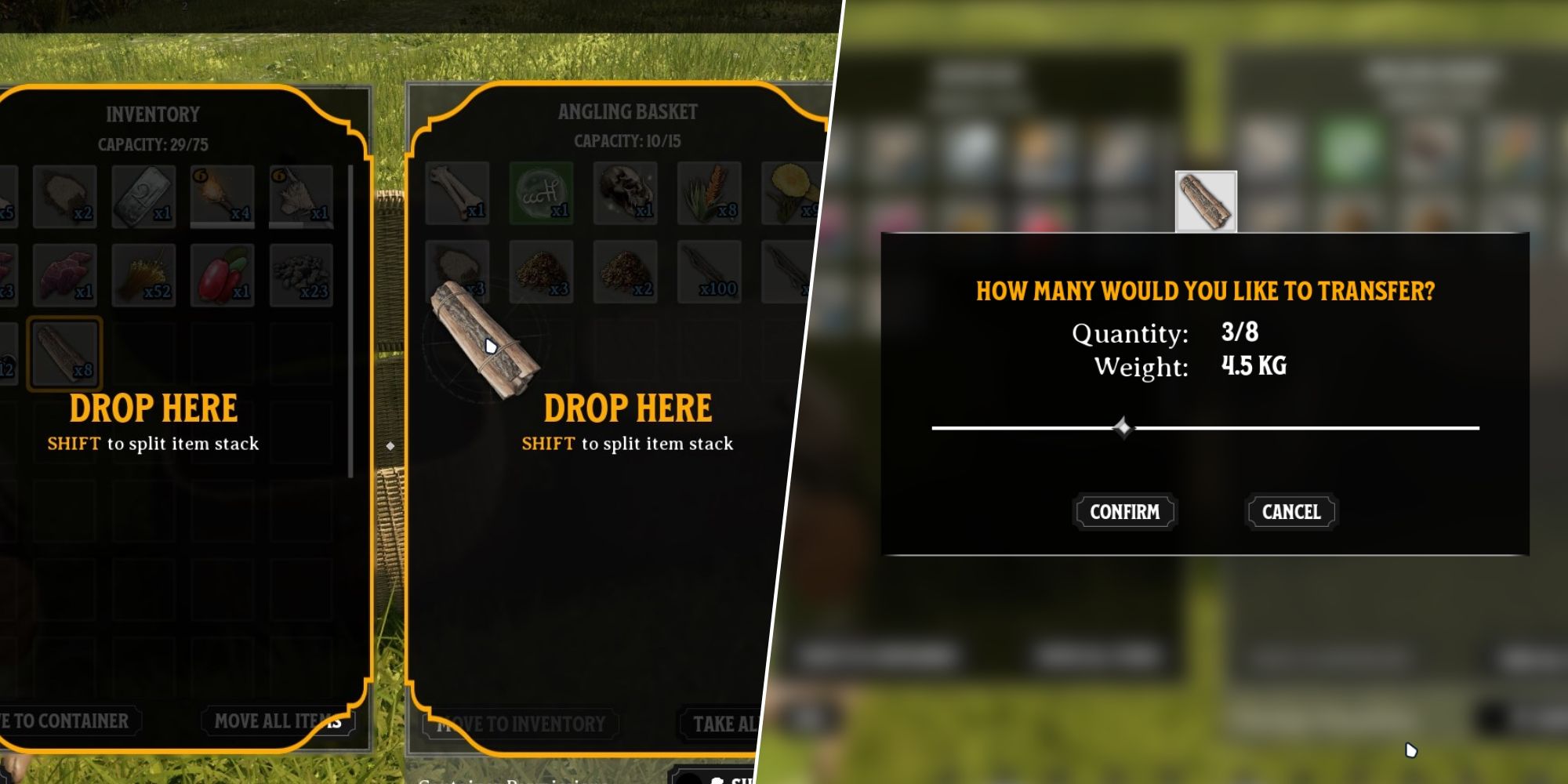
Like a true-blue survival game, Nightingale sees players chopping down trees, breaking down rocks, and collecting all manner of knick-knacks to build and survive in the realms. One of the very first problems players will run into as soon as they start getting into the flow of things is the inability to split items stacks.
Nightingale: 10 Tips & Tricks For Beginners
Nightingale’s magical realms contain many secrets. Follow these new-player tips and tricks to make sure you hit the ground running.
It looks like this basic feature present in every single survival game ever has seemingly not been implemented in Nightingale. There is a way to split stacks of items, but it might not be what you’re thinking. You’ll have to go about it in a roundabout way. Here is what you need to do.
Nightingale
- Released
- February 20, 2024
- Developer
- Inflexion Games
How To Split Item Stacks
Splitting Stacks is not possible directly in the inventory. The only way to split stacks that’s currently possible in the game is either by dropping the stack or by using a separate container.
Split Using Drop
- Open your inventory (I).
- Hold left-click on the item to drag it.
- Move the stack over to ‘Drop’ in the middle of the screen.
- Move the slider to adjust.
The selected amount will be dropped to the ground. But if it’s picked up again, it’ll go back to the same stack.
Split Using Inventory
- Drag the item you want to split stacks of to the new inventory space.
- Drop it while holding Shift.
- Split the stack using the slider, and one-half of it will remain in your inventory while the other half goes into the new inventory space.
Anything that counts as a new inventory space counts for these purposes. Crafting benches, campfires, storage chests, and even follower inventories can be used for splitting stacks. If you’re splitting stacks to manage your carry weight, using a follower is the easiest option. You can find your first follower by completing a short quest in the Abeyance Realm during the tutorial section of the game (right beside the Essence Trader). The gameplay loop that worked for me was to first recruit a follower, start chopping down trees, and drop stuff in their inventory to keep myself from becoming over-encumbered.
I also found myself wanting to split stacks in order to convert some of my excess resources, like Plant Fibre, into Essence Dust to buy items from the trader. Fortunately, you don’t need to split stacks for this. If you have a large stack of an item and you want to convert some of it – but not all of it – into Essence Dust, the only thing you need to do is right-click and select ‘Extract.’ You’ll be shown a slider that can be dragged to the left or right to decrease or increase the amount of the item you want to convert. No need for splitting stacks.
Nightingale’s take on survival genre is refreshingly unique but it can be a bit confusing at times. To understand the realms more you might find our how to unlock antiquarian cards or how to get carved wood guides helpful.

Nightingale: How To Switch To 3rd-Person View
Nightingale is the latest big drop on Steam that promises a Survival Crafting experience, but it is much better with a 3rd-person view!